
Desktop app for Linux · v0.1.1
Teku
Install Linux apps from a right-click.
Teku is a free, open-source package installer for Linux. Right-click a .deb, .rpm, AppImage or .flatpakref file and Teku checks the file and your distro, then installs it — or tells you plainly why it can't.
Install in one line
$ curl -fsSL https://raw.githubusercontent.com/anuzdhk/teku/main/install.sh | bash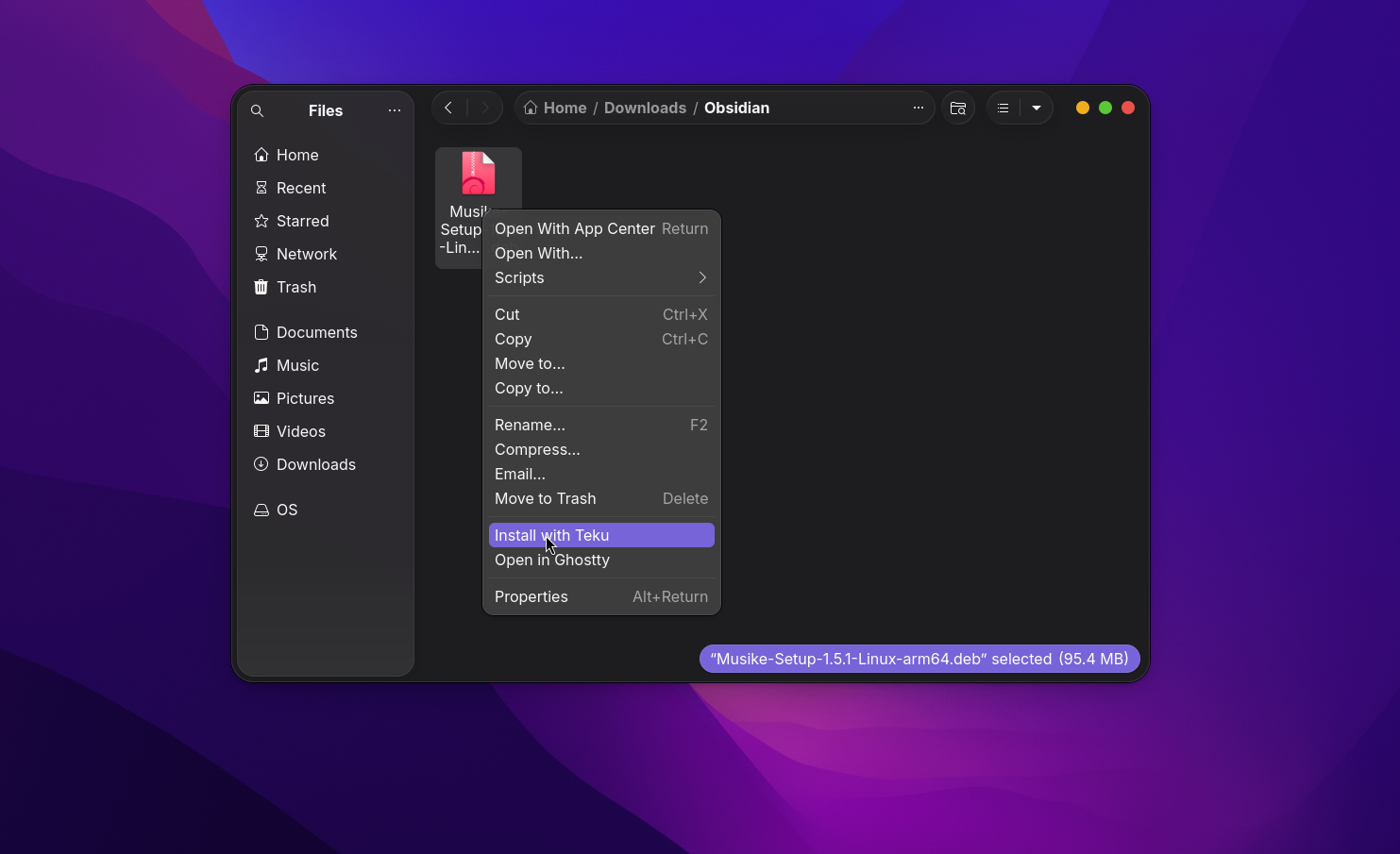
- Formats
- 4
- Works on
- Any distro
- Written in
- Bash
- License
- MIT
Features
What Teku does
Right-click to install
Install with Teku shows up right in the menu of GNOME Files, Dolphin and Nemo, and under Open With everywhere else.
Knows your distro
Reads /etc/os-release (ID and ID_LIKE) and picks the right tool: apt-get, dnf or zypper.
Can't be fooled
File types come from the file's contents — file plus magic bytes — so a renamed file can't trick it.
AppImages done right
Moves the AppImage to ~/Applications, makes it executable and adds a menu entry with its icon. Remove it later with one command.
Flatpak refs too
.flatpakref files install with flatpak install --from on any distro that has Flatpak.
Plain-English errors
Got a .exe, .msi, .dmg or .pkg? Teku explains it's a Windows or macOS app instead of failing silently.
Three tiny popups
The whole UI is small dark popups: confirm → progress → done or error. Nothing else to learn.
Terminal friendly
Skip the popup with -y, go terminal-only with TEKU_NO_GUI=1, or dry-run with --detect.
Logs you can read
Click Show log on any error, or open ~/.local/state/teku/last.log. Every attempt is kept in history.log.
How it works
4 steps, no terminal
- 1
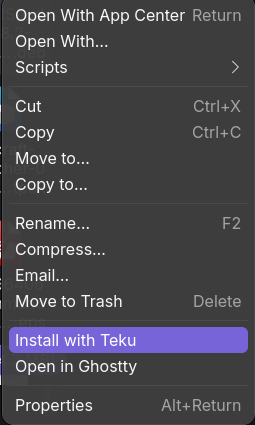
Right-click a file
Choose Install with Teku in your file manager's menu.
- 2
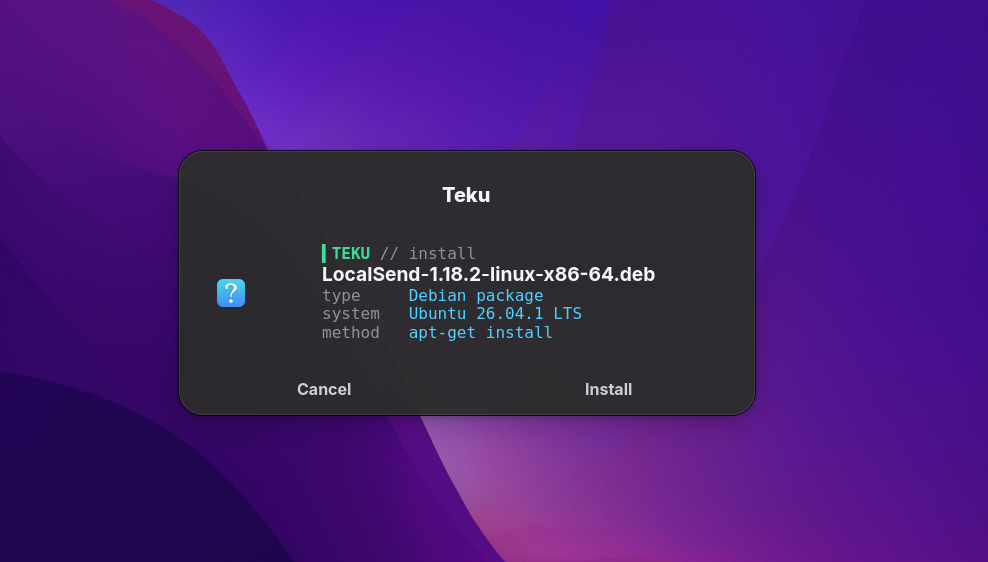
Confirm
Teku shows the file type, your system and how it will install it.
- 3
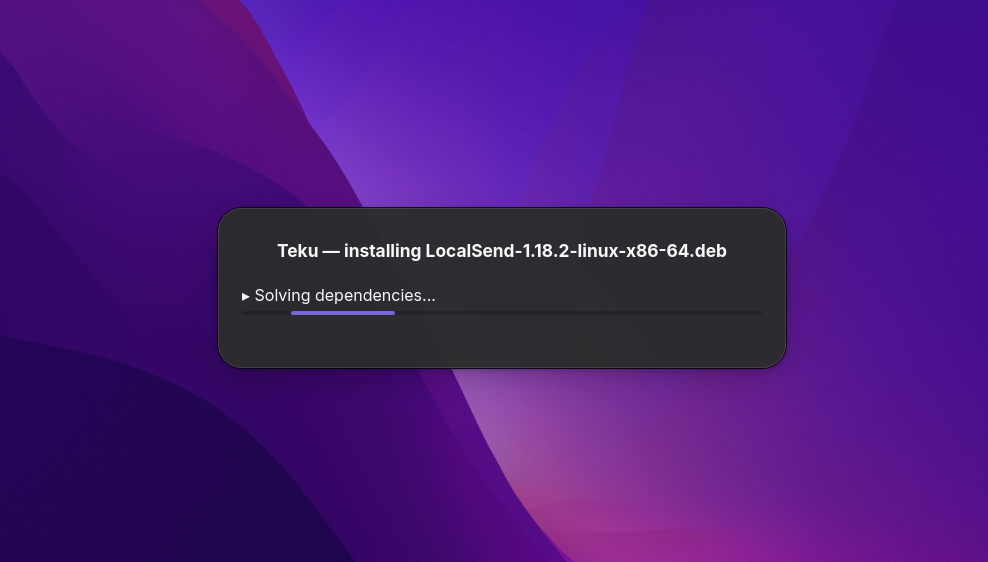
Installing
Watch the real installer output while it runs.
- 4
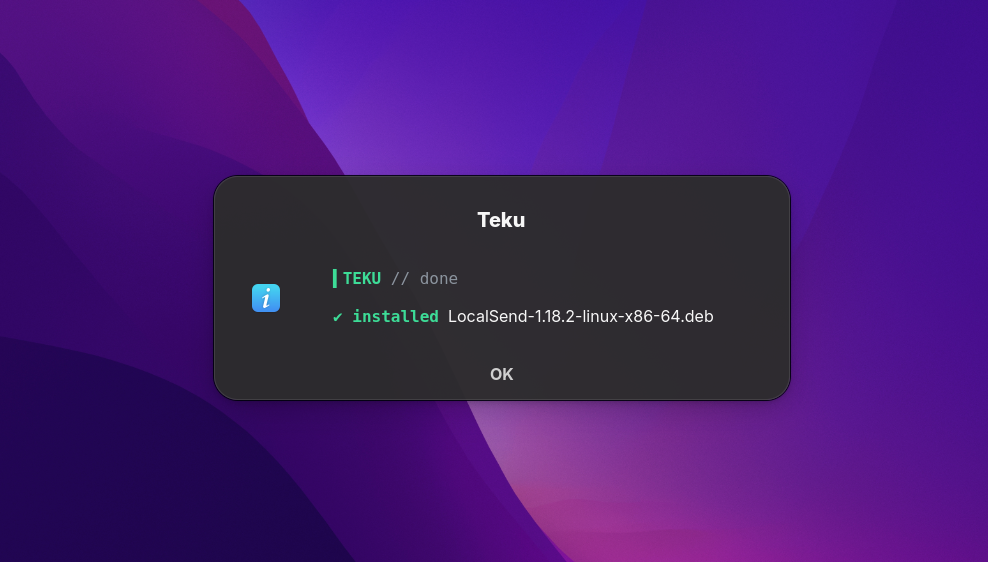
Done
A clear done — or a clear reason why not.
Supported
Every common Linux package, handled
Teku detects the format from the file itself and routes it to the right installer for your distro.
| File | Works on | What Teku does |
|---|---|---|
| .deb | Debian, Ubuntu, Mint, Pop!_OS | pkexec apt-get install |
| .rpm | Fedora, RHEL, openSUSE | pkexec dnf install / pkexec zypper install |
| .AppImage | Any distro | Moves it to ~/Applications, makes it executable, adds a menu entry + icon |
| .flatpakref | Any distro with Flatpak | flatpak install --from |
| .exe .msi .dmg .pkg | — | Explains it's a Windows or macOS app |
Install
Install Teku on Linux
Pick the package for your distro. Every file is on the latest GitHub release. Not sure which distro you have? Run cat /etc/os-release.
Quick install (any distro)
install.sh
Picks the latest .deb, .rpm or AppImage for your distro and installs it. Set TEKU_FORMAT=deb, rpm or appimage to choose yourself.
$ curl -fsSL https://raw.githubusercontent.com/anuzdhk/teku/main/install.sh | bashUbuntu, Debian, Linux Mint, Pop!_OS, Zorin, elementary, KDE Neon
teku_0.1.1_all.deb
Keep the ./ or apt looks in its repositories instead. apt also pulls in zenity, python3-nautilus and flatpak if they're missing.
$ cd ~/Downloads$ wget https://github.com/anuzdhk/teku/releases/download/v0.1.1/teku_0.1.1_all.deb$ sudo apt install ./teku_0.1.1_all.deb$ nautilus -qFedora, RHEL, CentOS Stream, Rocky, Alma
teku-0.1.1-1.fc44.noarch.rpm
dnf also installs zenity, nautilus-python and flatpak if they're missing.
$ cd ~/Downloads$ wget https://github.com/anuzdhk/teku/releases/download/v0.1.1/teku-0.1.1-1.fc44.noarch.rpm$ sudo dnf install ./teku-0.1.1-1.fc44.noarch.rpm$ nautilus -qopenSUSE Tumbleweed / Leap
teku-0.1.1-1.fc44.noarch.rpm
The RPM isn't signed, so zypper needs --allow-unsigned-rpm. The fc44 in the name is only a build tag — the package is noarch and works on openSUSE.
$ cd ~/Downloads$ wget https://github.com/anuzdhk/teku/releases/download/v0.1.1/teku-0.1.1-1.fc44.noarch.rpm$ sudo zypper install --allow-unsigned-rpm ./teku-0.1.1-1.fc44.noarch.rpm$ nautilus -qArch, Manjaro, EndeavourOS, anything else
Teku-0.1.1-x86_64.AppImage
When Teku asks “Add Teku to your right-click menu?”, choose Add. The menu entries point to this exact path, so open it again if you move it. For GNOME Files' top-level entry, also install python-nautilus. No libfuse2 needed.
$ sudo pacman -S zenity $ mkdir -p ~/Applications && cd ~/Applications$ wget https://github.com/anuzdhk/teku/releases/download/v0.1.1/Teku-0.1.1-x86_64.AppImage$ chmod +x Teku-0.1.1-x86_64.AppImage$ ./Teku-0.1.1-x86_64.AppImageFrom source
Needs git and make
No root? make install-user installs into ~/.local instead.
$ git clone https://github.com/anuzdhk/teku.git$ cd teku$ sudo make install
Requirements
What Teku needs
The .deb and .rpm packages install all of this for you. Only the AppImage and source installs need you to check it.
| Program | What for | Already on most desktops? |
|---|---|---|
| bash, file | The script itself, file detection | Yes |
| pkexec (polkit) | The password prompt for system installs | Yes |
| zenity | The popups | GNOME yes; KDE often no |
| Nautilus Python plugin | Top-level Install with Teku in GNOME Files | No (optional) |
| flatpak | Installing .flatpakref files | Varies (optional) |
Check it works
Where to find Teku
Run teku --version (it prints teku 0.1.1), then right-click any .deb, .rpm, .AppImage or .flatpakref file.
| File manager | Where to find Teku |
|---|---|
| GNOME Files (Nautilus) | Install with Teku in the menu (needs the Python plugin), or Scripts → Install with Teku |
| Dolphin (KDE Plasma) | Install with Teku in the menu (AppImage: Open With) |
| Nemo (Cinnamon / Mint) | Install with Teku in the menu (AppImage: Open With) |
| Any other | Open With → Install with Teku |
Uninstall
Removing Teku
Uninstalling Teku doesn't touch apps you installed with it. For the AppImage, delete the file and the menu entries it added.
| Installed with | Remove with |
|---|---|
| .deb | sudo apt remove teku |
| .rpm (Fedora) | sudo dnf remove teku |
| .rpm (openSUSE) | sudo zypper remove teku |
| sudo make install | sudo make uninstall |
| make install-user | make uninstall-user |
Command line
Prefer the terminal?
Everything the popups do is available as a command, so Teku fits in scripts too.
teku FILE... # installteku --uninstall-appimage [FILE] # remove an AppImage Teku installedteku --detect FILE... # show what Teku sees, install nothingteku -y FILE # skip the confirm popupTEKU_NO_GUI=1 teku FILE # terminal output onlyFAQ
Teku questions
How do I install a .deb file on Ubuntu without the terminal?
Install Teku, then right-click the .deb file and choose Install with Teku. Teku confirms the package, asks for your password through pkexec and runs apt-get install for you.
Can Teku install .rpm files on Fedora and openSUSE?
Yes. Teku reads /etc/os-release to detect your distro and uses dnf on Fedora/RHEL or zypper on openSUSE.
How does Teku install AppImages?
It moves the AppImage to ~/Applications, makes it executable and adds a menu entry with its icon, so it shows up like any other app. Remove it with teku --uninstall-appimage.
Can Teku install Windows .exe or macOS .dmg files?
No. Teku recognises .exe, .msi, .dmg and .pkg files and explains that they are Windows or macOS apps instead of failing with a confusing error.
“Install with Teku” isn't in my right-click menu. What do I do?
Run nautilus -q, or log out and back in. In GNOME Files, the top-level entry needs the Nautilus Python plugin; without it, look under Scripts or Open With. With the AppImage, Dolphin and Nemo show Teku under Open With.
Why do I get “E: Unsupported file ./teku_0.1.1_all.deb given on commandline”?
You're not in the folder that holds the file. Run cd ~/Downloads first, or give apt the full path.
Nothing happens when I click Install with Teku.
Run Teku on the file from a terminal, for example teku ~/Downloads/some-app.deb, to see what's wrong. If it prints text instead of showing popups, zenity is missing or there's no display.
The password prompt never appears.
Teku uses pkexec, which needs your desktop's polkit agent. GNOME, KDE, Cinnamon and Xfce include one. Minimal window managers like i3 and sway need one started, for example polkit-gnome or lxpolkit.
An install failed. Where is the log?
Click Show log in the error popup, or open ~/.local/state/teku/last.log. Every attempt is listed in ~/.local/state/teku/history.log.
How do I update Teku?
Download the new version and install it the same way; apt, dnf and zypper replace the old one. For the AppImage, delete the old file and open the new one once so the menu entries point at it.
Is Teku free?
Yes. Teku is free and open source under the MIT License.
More from Little Systems
 TaskMonitor
A modern, lightweight task manager for Linux.
- BillPilot
Free invoices for freelancers, in under a minute.
- StickyWeb
Sticky notes, right on the web page.